
Anubis Casino App in Australia: Play on Your Phone With No Download
The Anubis Casino app is the mobile version of the casino site: there is no native app to download, and the whole casino opens in Safari on an iPhone or in Chrome on an Android phone. Anubis Casino Australia gives you the same lobby, AUD cashier, promotions and account on a phone as on a computer, with one email and one password for both.
Nothing to install and no store listing to look for: a home-screen icon set up from the Safari or Chrome menu opens the casino in one tap.
Why There Is No Anubis Casino App in the App Store or Google Play
Both big app stores have rules that keep real-money casino apps away from Australian phones. Apple's App Store guidelines ask a gambling app to hold a licence in every jurisdiction where it is offered and to be geo-restricted to those places. Google Play allows real-money gambling apps in Australia only for locally licensed operators, such as sports wagering and lottery services, a group that online casinos do not belong to.
Anubis Casino is run by Novatrix SRL, a Costa Rica company, under e-gaming licence No. 0000002 from the Tobique Gaming Commission. Its official site carries no App Store link, no Google Play link and no APK file. A store search for Anubis Casino therefore cannot lead to an official app, and the casino's own web address in Safari or Chrome is the way in. The casino is made for the browser instead, so the site you open on a phone is the whole product, with the lobby, the cashier and the promotions of the desktop version.
What Opens on Your Phone: Menu, Lobby and Wheel
The mobile site stacks its sections from the top of the screen down, so the whole casino fits a narrow display:
- The top line: the menu button, the Anubis Casino logo, your balance in AUD and a yellow wallet button.
- A row of tiles for Promotions, Tournaments, Collections, Providers and VIP Program, the site's mobile navigation.
- The welcome banner, GET UP TO 3000 AUD BONUS + 360 FREE SPINS, with a DEPOSIT button under it.
- The lobby tabs, opening with Hot, Slots, Live and New Games, and a Search field below them.
- Game tiles, each with the title and the studio that made it.
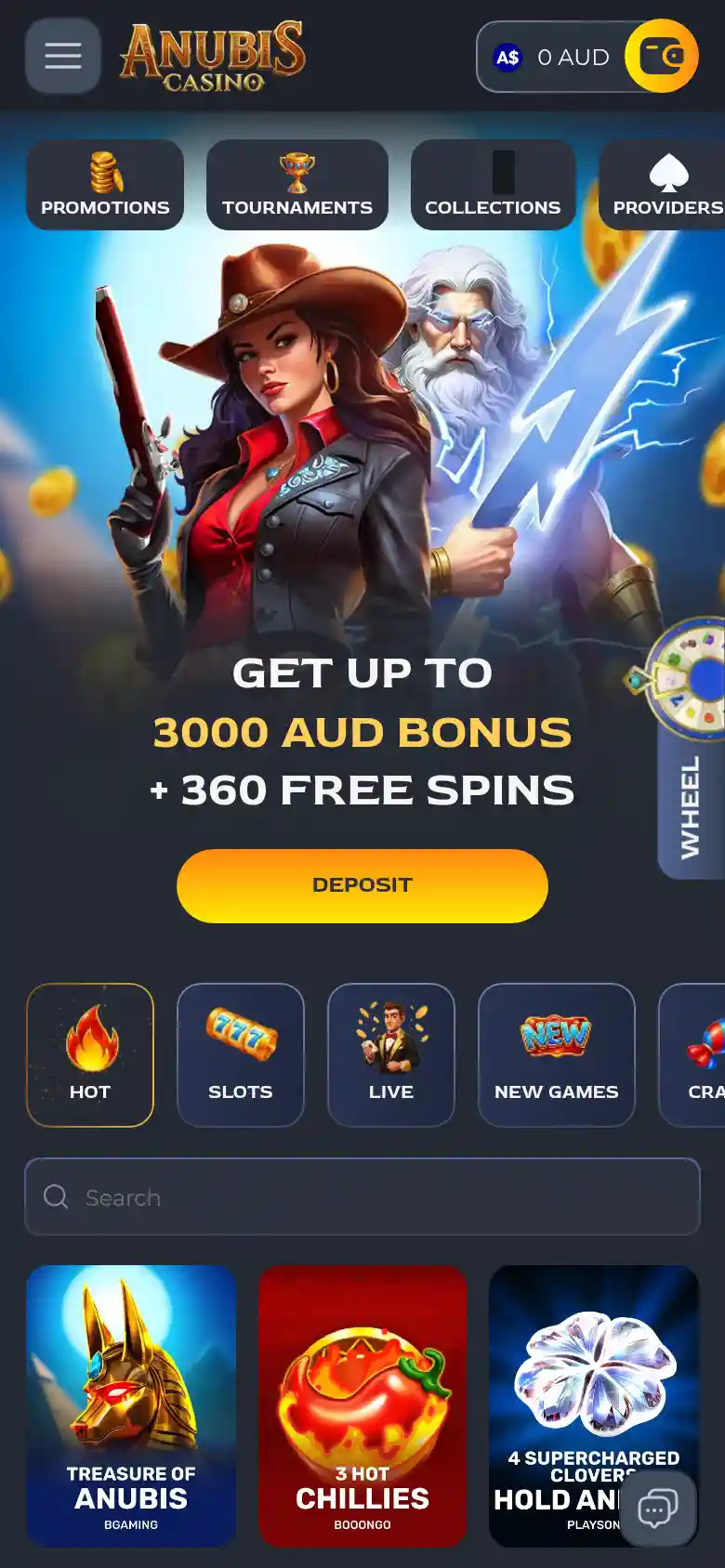
A WHEEL tab sits on the right edge of the screen, and a chat button in the bottom corner starts Live Chat. The menu button in the top corner opens the site menu, and the wallet button next to the balance leads to deposits and withdrawals. The balance in the top line is shown in AUD, the currency chosen at sign-up.
iPhone First: Add Anubis Casino to Your Home Screen in Safari
iPhones make up 62.6% of mobile browsing in Australia, and Safari can put the casino on the home screen as an icon. The steps below use Safari's own Share menu, not an installer from the casino:
Open the site in Safari
Open the Anubis Casino site in Safari and wait for the lobby to load.
Tap Share
Tap the Share button, the square with an upward arrow, in the Safari toolbar.
Choose Add to Home Screen
Scroll down the share sheet and choose Add to Home Screen.
Check the icon name
Check the name for the icon and shorten it if you like.
Tap Add
Tap Add, and the icon appears on the home screen with your other apps.
The icon opens the same address you use in the browser, with the same lobby, cashier and account. Nothing goes through the App Store and no file is downloaded. A long press on the icon removes it like any other.
Android: A Chrome Shortcut Instead of an APK
On an Android phone, Chrome makes the same kind of shortcut from its menu:
Open the site in Chrome
Open the Anubis Casino site in Chrome.
Open the Chrome menu
Tap the three-dot menu in the top right corner.
Choose Add to Home screen
Choose Add to Home screen.
Confirm the shortcut
Confirm with Add or Install, whichever Chrome shows, and drag the icon where you want it.
Anubis Casino has no APK, so playing here never needs the Android setting that allows installs from unknown sources. A file offered as an Anubis Casino APK on a download site does not come from the casino, so leave it alone and keep to the casino's address in Chrome. Checking the address bar before you type your password is the simplest guard against copies of the site.
Mobile Site or Store App: What Changes for You
Players used to store apps often ask what they give up by playing in a browser. This is how the Anubis Casino mobile site compares with a typical app from a store:
| Point | Anubis Casino mobile site | Typical store app |
|---|---|---|
| Where it comes from | The casino's own address in Safari or Chrome | A listing in the App Store or Google Play |
| Setting up | An optional home-screen icon from the browser menu | Downloading and installing the app |
| Space on the phone | No app file, only the browser's usual cache | The app and its stored data |
| Updates | Changes show the next time the page loads | New versions installed through the store |
| Account | The same email and password as on a computer | A sign-in inside the app |
| Cashier, promotions, Wheel | The same deposit window, offers and Wheel of Anubis as on desktop | The features its publisher includes |
On a phone, Anubis Casino works only the first way, through the browser, with nothing to install.
Pokies, Live Tables and Crash Games on a Small Screen
The lobby on a phone keeps every tab of the desktop version in one row that scrolls sideways: Hot, Slots, Live, New Games, Crash, Roulette, Table, Casual, Lottery, Poker Games and Jackpot Games. Pokies fill the Hot and Slots tabs, and each tile names the game and its studio, for example Treasure of Anubis by BGaming, 3 Hot Chillies by Booongo and 4 Supercharged Clovers Hold and Win by Playson. Treasure of Anubis is also where the free spins of the welcome package are played.
Game tiles carry a DEMO button, so a new pokie can be tried without money before you deposit. The Live tab holds the live dealer tables, and the Crash tab collects the fast games where a multiplier climbs until you cash out. For a game you already know, the Search field under the tabs is quicker than scrolling. Collections and Providers sort the lobby in other ways: the providers page lists about 75 studios, among them Playson, Spribe, Yggdrasil, Belatra and the live studio BeterLive.
Deposits and Cash Outs From Your Phone
Deposits on the phone go through the same cashier window as on a computer. Visa and Mastercard payments run from A$20 to A$6,000 and land on the balance at once, and buttons for A$30, A$100, A$500, A$1,000 and A$2,000 fill in the amount with one tap. The card's bank may ask for a 3-D Secure code, sometimes more than once. Crypto players can pay in Bitcoin, Litecoin, Ethereum, Dogecoin or USDT, and Neosurf vouchers are accepted too.
To cash out your winnings from the phone, open the Withdrawal tab: it offers Bitcoin, Litecoin, Ethereum, Dogecoin, USDT and Bank Transfer, and a Bitcoin payout runs from A$15 to A$6,000. Paste a crypto address rather than typing it, because a payout sent to a wrong address cannot be recovered. Anubis Casino aims to process withdrawals within 72 hours of approval, bank transfers arrive within 3 business days, and the terms set limits of A$4,000 a day, A$8,000 a week and A$24,000 a month, with progressive jackpot wins paid in full outside them.
Bonuses on the Phone: Promotions, Wheel and Tournaments
Promotions tile
The Promotions tile opens the full offer list, with no bonus kept only for phones. The Anubis Casino promotions start with the Anubis Gate package of 325% up to A$3,000 + 360 free spins over five deposits, and after those five deposits the weekly Calls of Anubis offers run on Tuesdays, Wednesdays and Fridays, by UTC.
WHEEL tab and tournaments
The WHEEL tab on the edge of the screen opens the Wheel of Anubis: a deposit of A$30 earns a spin, and the prizes range from A$15 to A$800 or from 50 to 200 free spins. In tournaments, a deposit of at least A$30 enters you automatically, every A$1 of real-money bets earns one point, and the Tournaments page shows the countdown and leaderboard of each event in the Seal of Power, Seal of Fate, Seal of Balance and Seal of Ascension series.
Bonus Rules That Follow You to the Phone: x50, 3 Days and a 5 EUR Bet
A bonus claimed on the phone follows the same rules as on a computer. According to the Bonus Terms & Conditions, each deposit bonus needs a deposit of at least A$30, carries a wager of x50 and lasts 3 days. While a bonus is active the maximum bet is 5 EUR or 5 USDT, so the bet buttons on a phone game screen have to stay under that line. Slots count 100% towards the wagering and roulette, card games and video poker 5%. Real money is wagered before bonus money.
Three days is short for a phone player who opens the casino in the evening only, so the bonus picker in the deposit window is best used on a day with time to play. A bonus can be cancelled before you start playing it, by asking support in Live Chat.
Opening and Using an Account From the Phone
Anubis Casino registration on a phone asks for an email and a password, then country, state and currency, where AUD sets the cashier to Australian dollars, and closes with the 18+ box. After that, the same login opens the account in Safari, in Chrome, from the home-screen icon and on a laptop. Under the terms there is one account per person, household, IP address and device, so a phone shared at home can carry only one account.
The phone camera also helps with verification: a selfie with your ID and a photo of a utility bill can go straight into the Verification tab as jpg or png files up to 10MB.
Checking You Are on the Real Anubis Casino Site
A copy of a casino site is the main risk when there is no store app to check. Four details on the real site are easy to look at on a phone before you type a password:
- The address: the casino lives at anubiscasino.com, and the Australian view opens at anubiscasino.com/en-AU.
- The footer: it names the operator, Novatrix SRL, with company number 3-102-893958, and the licence as “E-gaming license No. 0000002 issued by Tobique Gaming Commission”.
- The seal: the licence seal in the footer links to validate.thetgc.ca.
- The support details: support@anubiscasino.com and the Live Chat item in the menu. Email from any other address is not from the casino.
Never send your password in a chat or an email, and write to support from the address linked to your account.
Live Chat and Email Help for Phone Players
Before writing to support from the phone, try the fix that matches what you see:
- A blank or half-loaded page: reload it, or close the tab and open the casino again from the home-screen icon.
- An icon that stopped working: delete it and add it again from the Safari or Chrome menu.
- A site that does not open at all: access can be limited in some regions, and the terms forbid using a VPN to get around geo-restrictions.
Live Chat opens from the round chat button on the lobby screen. Email goes to support@anubiscasino.com, and the contact form on the support page needs only your email and a message. The site lists its support as 24/7.
Play Limits on Your Phone and Where to Get Help
Short sessions on a phone add up over a day. The Responsible Gambling section of the account sets a session limit for the casino in minutes and loss limits per day, week or month. The phone can add its own cap: Screen Time on an iPhone and Digital Wellbeing on Android set a daily time limit for Safari or Chrome.
Play is open to adults of 18 or the legal age where they live, whichever is higher. Gambling Help Online offers free, confidential support on 1800 858 858 around the clock and at gamblinghelponline.org.au.
Mobile Questions: Store Listings, Lost APKs and Offline Play
Is an Anubis app in Google Play the casino’s app?
No. Slot games and apps with “Anubis” in their name, in Google Play or the App Store, come from other publishers, since Anubis Casino has no store app. None of them opens your casino account, which lives on the casino site.
What should I do with an Anubis Casino APK I installed?
Delete it. Anubis Casino has no APK, so the file did not come from the casino. If you typed your casino password into it, change the password in the Security tab and switch on two-factor authentication.
Can I play without an internet connection?
No. Game rounds, the balance and the cashier all load from the casino site, so the phone needs mobile data or Wi-Fi throughout. For live dealer tables, a steady Wi-Fi connection keeps the stream smooth.
Can I start on the laptop and carry on from my phone?
Yes, as far as the account goes: the balance, active bonuses and VIP points belong to the account, so they show the same after you sign in on the phone. Close the game on the laptop first, then open it again from the phone lobby.
Do I need to update anything on my phone?
No. The casino is a website, so you always open its current version, and a home-screen icon only opens the same address. There is no app version to update. Keep Safari or Chrome up to date as you would for any site.
Which phone browsers does the casino support?
The casino does not publish a list of supported browsers or minimum system versions. This page uses Safari on iPhone and Chrome on Android, and the site’s own menus and cashier work the same way in both. If a page does not load, reload it, then try the other browser and write to support.
Is it safe to log in on public Wi-Fi?
The connection to the site is SSL-encrypted on Wi-Fi and mobile data alike, but a password typed on a shared or public device is only as safe as that device. Switch on two-factor authentication in the Security tab and sign out when you finish.
Are the bonuses the same on the phone as on a computer?
Yes. There is no phone-only offer, and the terms, the 3-day duration and the x50 wager are the same on every device.
Updated: